

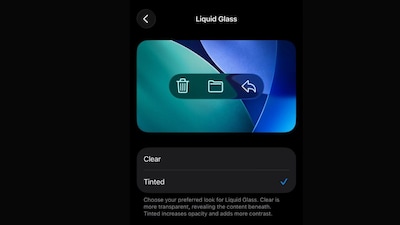
Apple’s iOS 26.1 Beta 4 update introduces significant new customization options for the Liquid Glass interface, giving iPhone users more control over the visual design.
Key Takeaways
- iOS 26.1 Beta 4 adds a new ‘Tinted’ option for Liquid Glass interface
- Users can now choose between Clear and Tinted glass effects
- Tinted version increases opacity and adds more contrast
- Customization available through Display & Brightness settings
What’s New in Liquid Glass Customization
The latest beta brings a dedicated toggle for Liquid Glass effects in Settings. Users can now select between two distinct visual styles:
- Clear: Maintains transparency, revealing content beneath the glass effect
- Tinted: Increases opacity and adds contrast for better visibility
The new option appears under Display & Brightness settings, providing straightforward access to interface customization.
Expanding User Control
Apple continues to refine the iOS 26 interface based on beta feedback. The company has already introduced transparency controls in previous updates, and Beta 4 expands these options further.
For users who prefer the traditional interface, Apple maintains the ability to disable Liquid Glass completely through Accessibility options. This demonstrates the company’s commitment to providing flexibility while introducing bold design changes.
The beta testing phase allows Apple to gather user feedback before finalizing features for public release.