
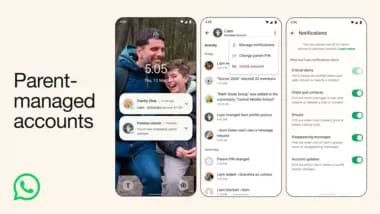
Meta-owned WhatsApp is introducing child protection on the platform with the launch of its new ‘parent-managed accounts’ feature. WhatsApp says the new feature is designed specifically for pre-teens and allows parents to strictly control who their children can interact with, while still keeping their personal conversations protected by end-to-end encryption.
“With input from families and experts, we’re rolling out new parent-managed accounts that allow parents or guardians to set up WhatsApp for pre-teens, with new controls to limit their WhatsApp experience to messaging and calling,” the company said in a blog post.
Here is everything to know about the new WhatsApp parent-managed accounts:
How does WhatsApp parent-managed account work:
Parents will need access to both their phone and their child’s phone in order to set up the new feature. In order to get started, they will need to put the two devices side by side to link both accounts.
After the setup is complete, the two accounts will be controlled by the parent or guardian. Here is everything they will be able to manage:
Restricted functionality: The child’s overall app experience is strictly limited to basic messaging and calling.
Contact approvals: Parents can explicitly decide who is allowed to contact the account.
Group management: Parents control which WhatsApp groups their child is allowed to join.
Message requests: If an unknown contact tries to reach out, parents have the ability to review those message requests and manage the account’s privacy settings before any interaction happens.
In order to prevent kids from bypassing these restrictions, WhatsApp has gated the parental controls and privacy settings with a dedicated ‘Parent PIN’ on the managed device. Only the parent can access or alter these settings, meaning they will be in charge of the family’s digital boundaries.
“All personal conversations remain private and protected with end-to-end encryption, meaning no one—not even WhatsApp—can see or hear them. We’re providing more tools and insights for parents, particularly around groups,” WhatsApp says.
How to set up a WhatsApp parent-managed account:
Step 1: Ensure both devices have the latest version of WhatsApp installed. Start on the child’s device. Download WhatsApp, choose your language, and tap ‘Agree and continue’. Tap ‘More options’ and select ‘Create a parent-managed account’. From there, register the child’s phone number and confirm their birthday.
Step 2: Tap ‘Continue’ to generate a QR code on the child’s screen. Open the camera on your (the parent’s) phone, scan the QR code, and tap the link to be redirected to WhatsApp.
Step 3: On your device, tap ‘Agree and continue’, verify your adult status, and create a secure 6-digit Parent PIN. This PIN is required to access or alter the child’s privacy settings and should be kept entirely secret from them.
Step 4: Return to the child’s device, enter the newly created Parent PIN, and tap ‘Continue’.
Who can use parent-managed account feature?
WhatsApp says the parent-managed account feature is rolling out gradually and may not be available in all regions yet. The company hasn’t shared a list of the countries where the feature is available yet.


