

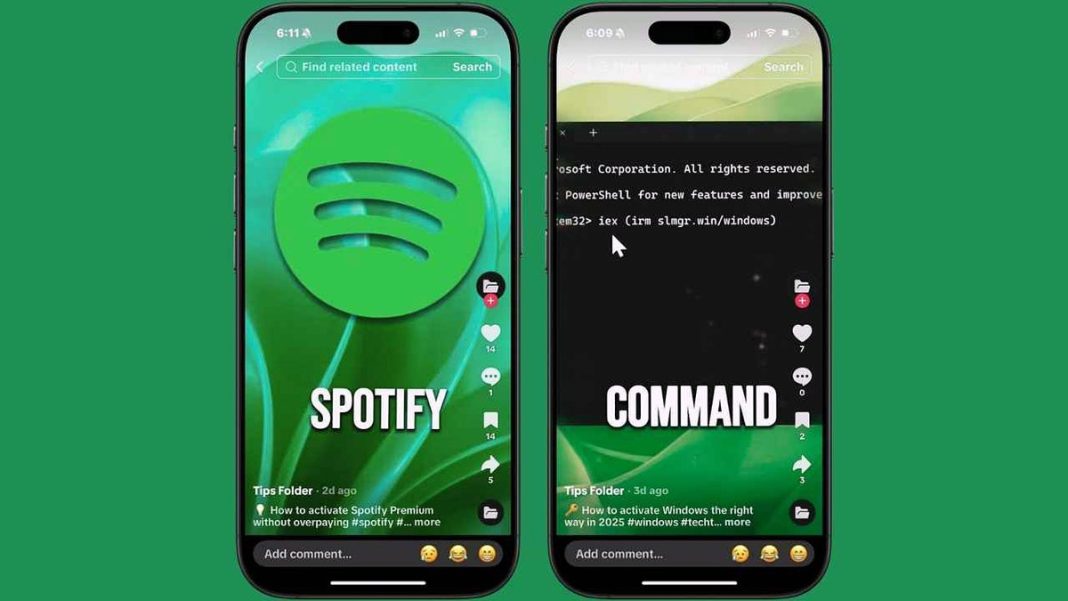
New TikTok Malware Scam Steals Passwords and Crypto Wallets
Cybercriminals are exploiting TikTok’s popularity with a dangerous new scam that tricks users into installing information-stealing malware. The attack disguises itself as free activation guides for popular software including Windows, Microsoft 365, Photoshop, Netflix, and Spotify Premium.
Key Takeaways
- Scammers post fake TikTok videos showing PowerShell commands that install Aura Stealer malware
- The malware steals passwords, cookies, cryptocurrency wallets, and authentication tokens
- Security expert Xavier Mertens first identified this ClickFix attack campaign
- Attack uses social engineering to make victims believe they’re following legitimate tech instructions
How the TikTok ClickFix Scam Operates
The scam uses what security experts call a ClickFix attack – a social engineering technique that makes victims feel they’re following legitimate technical instructions. The videos show short PowerShell commands and instruct viewers to run them as administrators to “activate” or “fix” their programs.
In reality, these commands connect to a malicious domain (slmgr[.]win) and download harmful executables from Cloudflare-hosted pages. The main file, updater.exe, is a variant of Aura Stealer malware that hunts for credentials and sends them back to attackers.
Another file, source.exe, uses Microsoft’s C# compiler to launch code directly in memory, making detection more difficult. While the purpose of this extra payload isn’t fully known, it follows patterns of previous malware used for cryptocurrency theft and ransomware delivery.
Protection Guide: 8 Essential Security Measures
Avoid Shortcuts: Never copy or run PowerShell commands from TikTok videos or random websites. Free premium software offers are typically traps.
Use Trusted Sources: Always download or activate software directly from official websites or legitimate app stores.
Keep Security Updated: Outdated antivirus or browsers cannot detect latest threats. Regular updates are crucial for protection.
Install Strong Antivirus: Use comprehensive antivirus software with real-time scanning against trojans, info-stealers, and phishing attempts.
Consider Data Removal Services: If personal data appears on dark web, removal services can alert you and help erase sensitive information.
Reset Credentials Immediately: If you’ve followed suspicious activation instructions, reset all passwords starting with email, financial, and social media accounts.
Use Password Managers: Generate and store complex, unique passwords for each site to reduce password reuse risks.
Enable Multi-Factor Authentication: Add extra security layers so even stolen passwords won’t grant access without verification.
Final Security Advice
TikTok’s massive global reach makes it an attractive target for scammers. What appears as a helpful tech hack could compromise your security, finances, and peace of mind. Remain vigilant, trust only verified sources, and remember there’s no such thing as a free activation shortcut for premium software.