

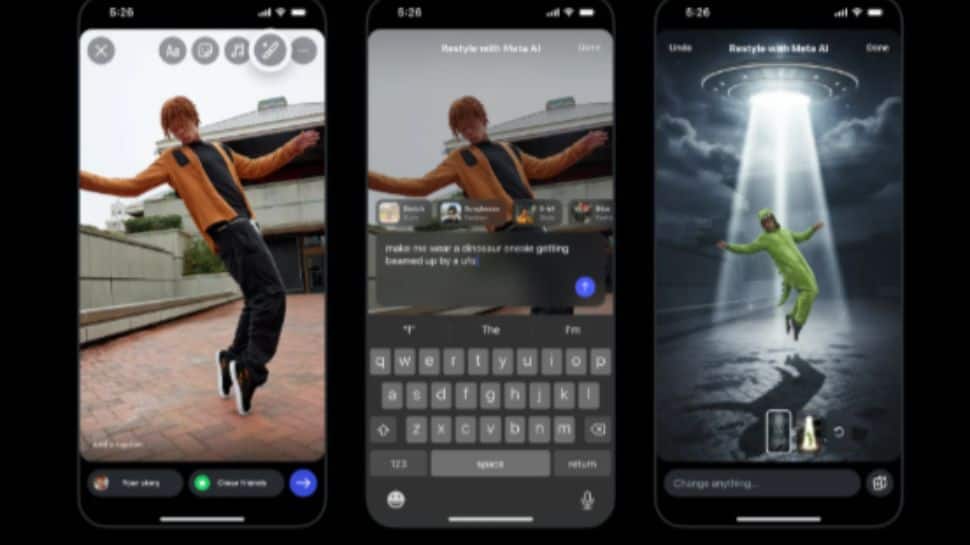
Instagram is rolling out a new ‘Restyle’ feature that enables users to edit photos and videos in Stories using simple Meta AI text prompts. This free tool allows users to add, remove, or modify elements in their media through natural language commands.
Key Features
- AI-Powered Editing: Transform images and videos using text prompts
- Preset Styles: Choose from various pre-made styles for quick adjustments
- Free to Use: No subscriptions or paid add-ons required
- Custom Text: Option to add custom text coming soon
The feature closely resembles Google’s Nano Banana image model and Google Photos’ “Help Me Edit” tool, bringing similar AI editing capabilities directly to Instagram Stories.
How to Use Instagram Restyle Feature
For Photos:
- Open Instagram and tap the + button at the top-left
- Select your image and tap the Restyle button (paintbrush icon)
- Use natural language prompts to add, remove, or change objects
- You can also ask Meta AI to replace the background
- Tap Done and post your Story
For Videos:
Follow the same steps but use available presets instead of full object edits for video content.
Writing Effective Prompts
Meta provides guidance for crafting better AI prompts, suggesting users consider:
- Subject matter
- Lighting and mood
- Composition
- Style preferences
- Location settings
The global rollout timeline remains unconfirmed, with availability likely tied to regions where Meta AI is currently active. This represents a significant expansion of Instagram’s AI capabilities, previously limited to the Meta AI chatbot.