
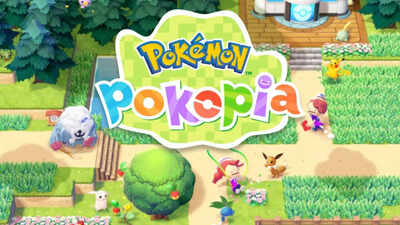
Pokémon games have always encouraged players to make friends, trade creatures, and fight together. Multiplayer features have become a big part of the Pokémon experience over the years. A lot of players like to explore game worlds on their own, but playing with others can make things even more fun. In Pokémon Pokéopia Friends, the multiplayer feature is meant to make the game more fun and social.
Pokéopia, the famous place that was in Pokémon battle arenas in older games, is back with a new focus on friendship and playing together. Players can invite friends, form teams, and do things together in the game.
The multiplayer system might seem a little confusing at first for people who are new to the game. It has a few steps, like connecting accounts, inviting friends, and joining shared sessions.
What is Pokémon Pokéopia Friends
Pokémon Pokéopia Friends is a multiplayer-focused Pokémon experience set in the Pokéopia arena environment. The setting is known for themed stadiums where trainers fight each other with their Pokémon teams.
Reports say that the original idea for Pokéopia locations was to make them big battle arenas where trainers from different areas could meet and compete.
In Pokéopia Friends, the idea has grown to include working together, fighting with friends, and exploring as a group.
The main reason for the multiplayer system is to let trainers talk to each other in real time. Players can set up sessions, invite friends, and play different games with each other.
Pokémon Pokéopia Friends multiplayer features
The multiplayer mode in Pokéopia Friends is all about playing with other people. Instead of playing alone, trainers can interact with others in several ways.
- Cooperative gameplay
Players can team up with friends and complete in-game activities together. In some missions, more than one trainer can work together in the same area to reach the same goals.
- Friendly battles
Pokémon battles remain an important part of the experience. Trainers can challenge their friends to casual battles to see how good their Pokémon teams are.
- Shared exploration
In some parts of the Pokéopia world, players can explore together. This could mean going to arenas, talking to other trainers, or doing mini challenges.
- Social interactions
Players can talk to each other by sending invitations or joining friend sessions in the game.
How to unlock multiplayer mode in Pokémon Pokéopia Friends
Players must complete a few simple tasks in the game before they can use the multiplayer features.
- Progress through the early tutorial
Players have to finish the tutorial before the game starts. This part talks about how to move, how to interact with Pokémon, and the basics of the game.
- Create or connect a player account
To use multiplayer functions, the game requires an online player account. This account is used to connect with other trainers.
- Access the multiplayer menu
Once the tutorial is complete, the multiplayer option becomes available in the main menu. Players can then create or join sessions.
Step-by-step guide to play Pokémon Pokéopia Friends multiplayer
Many new players wonder how to actually start a multiplayer session. The process usually follows a few simple steps.
-
Players should start by choosing the multiplayer option from the main menu. This part has all the online features.
-
You can choose between two things in the game. A player can either join a lobby that is already there or make a new one.
-
If a player makes a lobby, they are the host. The host can ask friends to join and set the rules for the session.
-
You can invite people on your friend list to join the game. Once they accept the invitation, they will be in the same lobby.
-
When everyone is there, the group can pick an activity, like a battle challenge or a cooperative mission.
-
All the players join in at the same time when the host starts the game or activity.
Tips for smooth multiplayer gameplay
The multiplayer system is easy to use, but a few simple tips can help players avoid common problems.
- Make sure the internet is working
For smooth gameplay, you need a stable internet connection. If the connection is unstable, multiplayer sessions may drop.
- Check to see if your friends are online
Players can only join friends who are currently playing the game online.
- Keep the game up to date
Updates to games often make multiplayer more stable and fix bugs.
- Use the list of friends
Adding friends to the player list makes it easier to send invitations quickly.
Why multiplayer is important in Pokémon games
Being able to play with other people has been one of the most important parts of Pokémon games for a long time. Trading and fighting with other trainers has always been a part of the franchise.
The point of playing Pokémon is to get players to talk to each other. Trading creatures, fighting each other, and exploring together can all make gaming more fun for everyone.
The idea behind Pokéopia Friends is the same: to play together and talk to other people.
The role of Pokéopia in Pokémon history
Pokéopia first appeared as a big battle arena where trainers fought in themed stadiums. It became known for having a competitive atmosphere and battle challenges that were well-planned.
Over time, the place became known for trainer meetups and planned fights. The new Pokéopia Friends game takes this idea a step further by letting players do more than just fight.


