
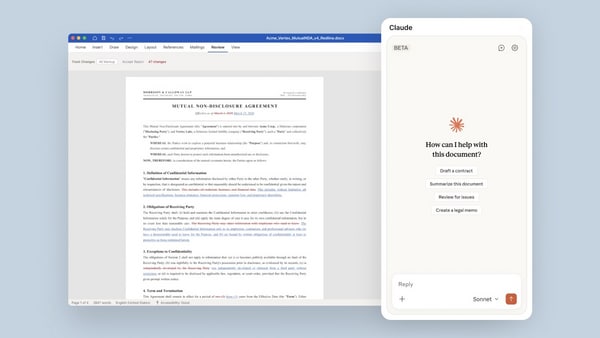
Anthropic has introduced a powerful new tool for professionals called Claude for Word. The new tool is currently in beta and is available only to Team and Enterprise plan subscribers. The feature allows users to directly integrate AI into their document flow in Word and is designed to handle tasks like legal reviews, financial memos, and iterative editing.
Here’s everything you need to know about Claude for Word and how you can set it up:
Claude for Word features:
Anthropic says Claude for Word can draft, edit, and revise documents directly from the sidebar. The AI can also preserve the user’s formatting, while users can also track edits as tracked changes.
“Claude for Word accelerates document work through intelligent assistance. It reads complex multi-section documents, works through comment threads, and edits clauses while preserving your formatting, numbering, and styles,” Anthropic wrote in a Microsoft Marketplace listing.
Here’s a list of all the features offered by Claude for Word:
Ask questions about documents: Claude for Word allows users to ask specific questions about their document, like summarising commercial terms or locating specific clauses. The AI provides answers complete with clickable citations that navigate directly to the referenced section.
Semantic navigation: The feature allows users to find every provision via a specific theme using prompts like “Find every provision touching data retention” or “Where does this agreement address termination?”
Iterative editing: You can select a passage and instruct Claude to change it by giving prompts like, “tighten this paragraph and drop the passive voice”. Anthropic says Claude edits only the given section while keeping the surrounding styles, formatting, and numbering the same.
Tracked changes: If you enter “suggested edits mode,” Claude’s edits will appear as tracked revisions, with the original text visible as a deletion and new text as an insertion. This allows users to accept or reject each change individually within Word’s native review pane.
Comment-driven editing: Claude for Word can read comment threads, understand the anchored text, and systematically work through them. For each open comment, Claude will edit the passage and reply to the thread explaining its changes.
Cross-app functionality: Claude for Word shares context with the Excel and PowerPoint add-ins. This means users can ask the AI to pull numbers from an Excel model into a Word memo or summarise a document into presentation slides without manually copying and pasting the data.
Why you may not want to use Claude for Word yet?
The feature is still in beta, and Anthropic warns that Claude for Word is not recommended for final client deliverables, litigation filings, or documents containing highly sensitive data without proper human verification.
The company also warned of “prompt injection attack risks” and advised users to only use the AI tool with trusted documents, since files from external sources could contain hidden malicious instructions designed to trick the AI into modifying critical content or extracting sensitive information.
How to set up Claude for Word?
For individual users, you need to navigate to the Claude for Word listing on the Microsoft Marketplace.
Click “Get it now” to install the add-in.
Open Microsoft Word, activate the add-in (from Tools > Add-ins on Mac or Home > Add-ins on Windows), and sign in with your Claude account.
For enterprise users, administrators need to deploy the tool across their organisation via the Microsoft 365 Admin Centre.


